

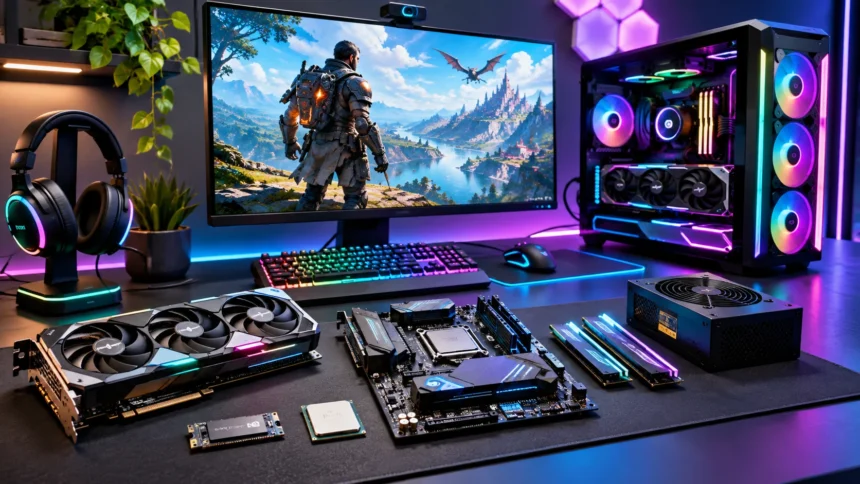
What Is Computer Hardware for Gaming?
Computer hardware for gaming includes the physical components that allow a computer to run video games smoothly and efficiently. These components work together to process instructions, display graphics, store game files, and support player interactions. Understanding gaming hardware helps beginners choose suitable equipment and recognize which parts influence performance during different types of games.
Unlike computers designed mainly for browsing or office tasks, gaming PCs often require more powerful graphics processing and effective cooling systems. Modern games can involve detailed environments, complex simulations, and fast-moving visual effects that place demands on hardware. The specific requirements depend on the game, desired resolution, graphics settings, and performance expectations rather than a single universal configuration.
Learning about computer hardware for gaming does not require professional technical knowledge or experience building computers. By understanding processors, graphics cards, memory, storage, and other important components, you can make informed decisions about gaming systems. This guide explains how gaming computer components work, why they matter, and how to select a balanced configuration for different needs.
Central Processing Unit: The Brain of a Gaming PC
The central processing unit, commonly called the CPU, handles instructions and calculations required by software and games. It manages tasks such as game logic, artificial intelligence, physics calculations, and communication between hardware components. A capable processor helps maintain consistent performance, particularly in games involving numerous characters, complex environments, or demanding simulations.
Modern gaming processors from Intel and AMD offer different combinations of cores, threads, clock speeds, and architectural features. More cores can help with multitasking and some demanding games, but core count alone does not determine gaming performance. Individual core performance, cache design, power limits, and software optimization also influence how efficiently a processor handles gaming workloads.
Choosing the right gaming CPU depends on the graphics card, preferred games, resolution, and overall budget. Competitive games targeting high frame rates may benefit from stronger processor performance, while graphically demanding games can depend more heavily on the GPU. Selecting compatible components helps avoid unnecessary spending and supports a balanced gaming computer configuration.
Graphics Processing Unit: The Most Important Gaming Component
The graphics processing unit, or GPU, is responsible for rendering images, environments, textures, and visual effects displayed during gameplay. Dedicated graphics cards provide specialized processing capabilities that help modern games run at higher resolutions and graphical settings. For many gaming systems, graphics performance has the greatest influence on visual quality and achievable frame rates.
Graphics cards from NVIDIA, AMD, and other manufacturers offer different performance levels and technologies. Important features include graphics memory, rendering capabilities, power consumption, and support for modern visual effects. Some GPUs also provide hardware-accelerated ray tracing and image upscaling technologies that can improve visual realism or performance when supported by individual games.
When choosing a gaming graphics card, consider whether you primarily play at 1080p, 1440p, or 4K resolution. Higher resolutions generally require greater graphics processing capability and sufficient video memory. It is also important to check power supply requirements, physical dimensions, and compatibility with your computer case before selecting a GPU.
RAM: Why Memory Matters for Gaming Performance
Random access memory, commonly known as RAM, temporarily stores information that games and applications need while running. This allows the processor to access frequently used data without repeatedly retrieving everything from slower storage devices. Having sufficient system memory helps games load resources efficiently and reduces performance problems caused by excessive memory usage.
For many modern gaming PCs, 16GB of RAM provides a practical starting point, although demanding games and heavy multitasking may benefit from 32GB. Some specialized workloads can require even more memory. The ideal capacity depends on the games being played, background applications, operating system requirements, and whether additional tasks are performed simultaneously.
RAM speed and configuration can also affect gaming performance in certain situations. Using compatible memory modules in an appropriate dual-channel configuration often provides better bandwidth than a single equivalent module. However, installing additional memory beyond what your games need does not automatically increase frame rates, so capacity should match actual usage requirements.
Storage Devices: SSD vs HDD for Gaming
Storage devices hold the operating system, installed games, applications, and personal files. Two common storage technologies are solid-state drives and hard disk drives. Although both store information, they operate differently and can influence how quickly games install, launch, load levels, and access large amounts of saved data.
Solid-state drives, or SSDs, use flash memory and generally provide faster access speeds than traditional mechanical hard drives. NVMe SSDs can deliver particularly high data transfer speeds when connected through compatible interfaces. These advantages make SSDs useful for modern games with large environments, frequent asset loading, and substantial installation sizes.
Hard disk drives remain useful when affordable storage capacity is more important than speed. They can store older games, media collections, backups, and files that do not require rapid access. For a practical gaming computer, installing the operating system and frequently played games on an SSD usually provides a more responsive experience than relying entirely on a traditional hard drive.
Motherboard: Connecting Every Gaming PC Component
The motherboard is the main circuit board connecting the processor, memory, graphics card, storage devices, and other hardware. It allows components to communicate and provides the connections needed for expansion and external accessories. Choosing a compatible motherboard is important because it determines which processors, memory technologies, and additional components your system can support.
Gaming motherboards are available in several form factors, including ATX, micro-ATX, and mini-ITX. Larger boards may provide additional expansion slots and connectivity options, while smaller designs can fit compact computer cases. Features such as USB ports, storage connectors, network capabilities, and power delivery systems vary depending on the motherboard model.
When selecting a motherboard, first confirm that its CPU socket and chipset support your chosen processor. Next, check memory compatibility, storage interfaces, graphics card support, and available expansion options. An expensive motherboard is not always necessary for gaming, especially when a reasonably priced model already provides the features and reliability your system requires.
Power Supply Unit: Providing Reliable Power
The power supply unit, commonly called the PSU, converts electricity from a wall outlet into suitable power for computer components. It supplies energy to the processor, graphics card, storage devices, and motherboard. A reliable power supply supports stable system operation and helps protect hardware against certain electrical problems when appropriate safety features are included.
Gaming computers with powerful graphics cards generally require more electrical power than basic office computers. The required wattage depends on the components installed, their power limits, and expected system loads. Selecting a PSU with sufficient capacity and suitable connectors helps ensure that the computer operates reliably during demanding gaming sessions.
Power supply quality matters as much as the advertised wattage. Look for models from reputable manufacturers with appropriate protections and reliable independent testing. Efficiency ratings can help compare energy conversion performance, but they do not guarantee overall build quality, making detailed product specifications and credible reviews important when evaluating power supplies.
Gaming PC Cooling Systems and Temperature Management
Gaming hardware generates heat while processing demanding workloads, making effective cooling important for reliable operation. Excessive temperatures can cause processors and graphics cards to reduce their operating speeds to prevent overheating. Proper airflow and suitable cooling equipment help components maintain appropriate temperatures during long gaming sessions and other intensive activities.
Air cooling systems typically use metal heatsinks and fans to transfer heat away from processors and other components. Liquid cooling systems circulate coolant through a closed loop to move heat toward a radiator. Both approaches can work effectively, depending on the hardware, case design, installation quality, and cooling capacity required.
Good case airflow is another important part of temperature management. Intake fans bring cooler air into the computer, while exhaust fans help remove warmer air. Keeping vents unobstructed, cleaning dust filters, and checking fan operation can improve long-term reliability without requiring expensive cooling upgrades or complicated maintenance procedures.
Gaming Monitors: Resolution, Refresh Rate, and Response Time
A gaming monitor displays the visual output produced by the graphics card and strongly influences how gameplay feels. Important characteristics include screen resolution, refresh rate, response time, panel technology, and adaptive synchronization support. Choosing suitable monitor specifications helps ensure that the display matches the performance capabilities of the gaming computer.
Resolution determines how many pixels appear on the screen, with common gaming options including 1080p, 1440p, and 4K. Higher resolutions can provide more detailed images but typically require greater graphics processing power. Refresh rate indicates how many times the display can update each second, influencing perceived motion smoothness during gameplay.
Competitive players often prefer monitors with higher refresh rates because they can display new frames more frequently. Meanwhile, players focused on cinematic experiences may prioritize resolution, color quality, or contrast. Adaptive synchronization technologies can also reduce screen tearing and improve visual consistency when supported by the monitor, graphics hardware, and game settings.
Gaming Keyboards and Mice: Input Hardware Explained
Gaming keyboards and mice are input devices that allow players to control characters, navigate menus, and interact with virtual environments. Their design can influence comfort, responsiveness, and precision during gameplay. However, expensive accessories are not necessary for every player, and choosing practical equipment depends on personal preferences and gaming habits.
Mechanical keyboards use individual switches beneath their keys and are available with different typing characteristics. Membrane keyboards offer another option and can be suitable for casual gaming or everyday computer use. Features such as programmable keys, rollover support, and customizable lighting may provide additional convenience, but their value depends on individual requirements.
Gaming mice often include adjustable sensitivity, programmable buttons, and sensors designed for accurate movement tracking. Comfort, grip style, and suitable button placement are important considerations during longer sessions. A reliable mouse and comfortable keyboard can improve the overall experience without requiring the most expensive models available on the market.
Computer Cases and Airflow for Gaming Builds
The computer case houses the internal gaming hardware and helps protect components from external damage. It also influences airflow, cooling options, noise levels, cable organization, and available space for future upgrades. Selecting a suitable case involves more than appearance because different designs support different motherboard sizes, graphics cards, and cooling systems.
Gaming cases commonly feature mesh front panels, removable dust filters, and mounting locations for several fans. These features can help maintain airflow around heat-producing components. Cases with limited ventilation may require careful cooling arrangements, particularly when housing powerful processors and graphics cards that generate substantial heat during intensive workloads.
Before purchasing a case, check motherboard compatibility, graphics card clearance, CPU cooler height, and power supply dimensions. Consider whether the case provides enough space for storage drives and future component upgrades. A practical design with accessible connections and manageable cable routing can make maintenance and hardware installation easier over time.
Integrated Graphics vs Dedicated Graphics Cards
Integrated graphics are graphics processing capabilities built into certain processors or processor packages. They share system resources and can handle everyday computing, video playback, and some gaming workloads. Dedicated graphics cards contain specialized processing hardware and their own graphics memory, generally offering substantially greater performance for demanding modern games.
Integrated graphics can be suitable for lightweight titles, older games, and less demanding competitive experiences. They may also reduce initial system costs and power consumption compared with computers requiring separate graphics cards. Actual gaming performance varies considerably between processors, memory configurations, game engines, and selected resolution or graphics settings.
Dedicated graphics cards become more important when playing visually complex games at higher settings or resolutions. They also provide additional capabilities for certain creative applications and graphics-intensive workloads. Choosing between integrated and dedicated graphics depends on gaming expectations, available budget, and whether upgrading the computer later is part of the plan.
Understanding FPS, Bottlenecks, and Gaming Performance
Frames per second, usually abbreviated as FPS, measures how many individual images a computer renders each second during gameplay. Higher frame rates can produce smoother motion when the display supports them. However, stable frame delivery and consistent response times also matter because irregular performance can cause noticeable stuttering even when average FPS appears relatively high.
A hardware bottleneck occurs when one component limits the performance of other components during a particular workload. For example, a powerful graphics card may not reach its full potential if the processor cannot supply rendering instructions quickly enough. In other situations, GPU performance, memory capacity, or storage activity may become the main limiting factor.
Bottlenecks change depending on game settings, resolution, and the applications running in the background. Monitoring CPU usage, GPU utilization, frame times, and memory consumption can help identify potential performance limitations. Instead of upgrading components randomly, understanding which hardware is actually limiting performance helps direct spending toward improvements that matter.
Building a Budget Gaming PC Without Overspending
Building a budget gaming PC requires balancing performance, reliability, and component costs. Rather than purchasing the most powerful hardware available, focus on the games you want to play and the performance you expect. A carefully selected combination of compatible components can provide an enjoyable experience without including unnecessary premium features.
For many entry-level systems, prioritizing a suitable graphics card, capable processor, adequate memory, and reliable SSD provides a useful starting point. A good-quality power supply and compatible motherboard are equally important for dependable operation. Choosing a simple computer case can also help preserve funds for components that have a greater influence on gaming performance.
Budget planning should include the monitor, keyboard, mouse, operating system, and other required accessories when they are not already available. Comparing independent performance reviews can help identify suitable component combinations. Leaving room for future upgrades may provide better long-term value than purchasing expensive hardware that exceeds your current gaming needs.
Gaming Laptops vs Desktop Gaming Computers
Gaming laptops combine the display, keyboard, processing hardware, and battery into a portable computer. Desktop gaming systems use separate components and often provide greater flexibility for cooling and hardware upgrades. Both options can support enjoyable gaming experiences, but their advantages depend on portability requirements, available space, performance expectations, and overall budget.
Gaming laptops are useful for students, travelers, and people who need one computer for different locations. However, compact designs create thermal and power limitations that can influence performance. A laptop graphics processor may perform differently from a similarly named desktop graphics card, making actual benchmark comparisons more useful than model names alone.
Desktop computers generally offer easier access to replaceable components, larger cooling systems, and more upgrade possibilities. They also allow users to select monitors and input devices independently. When comparing laptops and desktops, consider total ownership costs, available workspace, maintenance requirements, and whether portability or future customization matters more to you.
How to Upgrade Gaming Hardware for Better Performance
Upgrading gaming hardware can improve performance without replacing an entire computer. Common upgrades include installing a stronger graphics card, increasing memory capacity, replacing slow storage, or changing the processor. However, the most effective upgrade depends on the existing system and the specific performance problems experienced during gameplay.
If games struggle at high graphics settings, a graphics card upgrade may provide a noticeable improvement. When memory usage regularly exceeds available capacity, additional RAM can reduce performance issues related to swapping data. Replacing an older hard drive with an SSD can improve loading times, although it may not significantly increase average frame rates.
Before purchasing replacement components, confirm motherboard compatibility, power requirements, physical dimensions, and operating system support. Some upgrades may require firmware updates or additional cooling capacity. Reviewing current performance and comparing realistic upgrade options helps avoid unnecessary expenses while extending the useful life of an existing gaming computer.
Common Gaming Hardware Mistakes to Avoid
One common mistake when choosing computer hardware for gaming is focusing entirely on a single expensive component. A powerful graphics card cannot guarantee excellent performance when paired with inadequate memory, unsuitable cooling, or an incompatible processor. Balanced hardware selection provides a more dependable foundation for different games and everyday computing activities.
Another mistake involves overlooking important compatibility requirements during a computer build. Processors must match supported motherboard sockets, memory modules must use compatible technologies, and graphics cards must fit inside the case. Ignoring power supply capacity or necessary connectors can also create installation problems that require unexpected replacement purchases.
Buying hardware solely because of advertising claims or impressive specification numbers can lead to disappointing results. Independent benchmarks, real game performance, warranty coverage, and long-term reliability often provide more useful information. Taking time to understand your actual needs helps prevent overspending and supports better purchasing decisions across the entire gaming system.
Future Trends in Computer Hardware for Gaming
Gaming computer hardware continues to develop as manufacturers introduce new processor architectures, graphics technologies, and storage capabilities. Improvements in energy efficiency and processing performance can support increasingly demanding games. However, the practical value of new hardware depends on software support, pricing, compatibility, and whether current equipment already meets the user’s gaming requirements.
Graphics technologies such as ray tracing and intelligent image reconstruction are influencing how modern games render lighting, reflections, and detailed environments. Faster storage interfaces and improved asset-loading technologies can also support more responsive gaming experiences. These developments create additional possibilities, although benefits vary depending on the game engine and supported hardware features.
Future gaming systems may offer improved performance while using power more efficiently and supporting increasingly sophisticated visual effects. Nevertheless, buying the newest components is not always necessary for enjoyable gameplay. Understanding performance requirements and evaluating real-world improvements remains more useful than upgrading simply because a newer generation of hardware becomes available.
Conclusion
Understanding computer hardware for gaming helps players make better decisions when purchasing, building, or upgrading a gaming PC. Components such as the CPU, GPU, RAM, motherboard, storage, and power supply each perform important functions. Their combined capabilities influence game performance, visual quality, system responsiveness, and long-term reliability across different gaming environments.
A balanced gaming computer does not always require expensive or top-of-the-line hardware. Choosing compatible components based on the games you play, your monitor resolution, and your available budget can provide excellent practical value. Reliable cooling, suitable storage, and appropriate input devices also contribute to a comfortable and dependable gaming experience.
Whether you are building your first computer or improving an existing system, understanding the basic hardware requirements makes the process easier. Compare real performance results, check compatibility, and prioritize upgrades that address genuine limitations. With the right combination of components, a gaming PC can remain capable, enjoyable, and adaptable for years.
Frequently Asked Questions (FAQs)
What are the most important computer hardware components for gaming?
The most important gaming hardware components include the graphics card, processor, RAM, storage, motherboard, and power supply. Each contributes to system performance, stability, compatibility, and the overall gaming experience.
Is 16GB RAM enough for gaming?
Yes, 16GB RAM is sufficient for many modern games, particularly when background applications are limited. However, some demanding titles, heavy multitasking, and additional workloads may benefit from 32GB or more.
Is a CPU or GPU more important for gaming?
Both are important, but the GPU often has a greater influence on performance in graphically demanding games. CPU performance becomes especially important in simulation games, complex environments, and high-frame-rate competitive gaming.
Does an SSD increase gaming FPS?
An SSD generally improves game loading times and data access rather than directly increasing average FPS. However, it may reduce certain loading-related delays and improve responsiveness in games that frequently access stored assets.
Can I build a gaming PC without a dedicated graphics card?
Yes, you can build a gaming computer using a processor with integrated graphics. This approach can support lighter games and some older titles, although demanding modern games typically benefit from dedicated graphics hardware.