


The 4K revolution has transformed our viewing expectations, yet most of our personal video libraries remain trapped in lower resolutions. Family memories on old camcorders, early YouTube downloads, DVD rips, and even recent smartphone videos often max out at 1080p or lower. Traditional upscaling simply stretches pixels, resulting in blurry, unsatisfactory images on modern 4K displays.
Enter the AI video upscaler—a technology that uses artificial intelligence to intelligently reconstruct detail rather than just enlarge pixels. Among the growing number of solutions, Media.io emerges as a particularly compelling option, especially for those seeking a balance between professional-grade results and accessible online processing. This review examines whether Media.io truly delivers on its promise to convert video to 4K with authentic quality improvements.
The 4K Revolution: Why AI Upscaling is a Game-Changer
Understanding why AI upscaling differs from traditional methods is crucial. When you normally make a 4K video through conventional software, each pixel from your source video gets multiplied and interpolated—essentially making educated guesses about color transitions. The result is smoother but fundamentally still lacking detail.
Media.io AI video upscaler technology works differently. It has been trained on millions of video pairs (low-res and high-res versions of the same content), learning patterns of how details like textures, edges, and patterns should appear at higher resolutions. When you upscale video to 4K online free with a true AI system, it doesn’t just smooth pixels—it synthesizes plausible new details based on contextual understanding.
Media.io leverages this advanced approach specifically optimized for various content types, whether you’re working with nostalgic home videos, anime collections, or professional footage that needs future-proofing.
4K Upscaler Showdown: Online vs. Desktop Solutions
| Tool | Core Positioning | Key Strengths | Main Limitations |
| Media.io AI Video Enhancer | A leading all-in-one online platform for easy, accessible video upscaling. | Maximum convenience (browser-based, no installation). Simple process. Integrated AI toolkit (e.g., background remover). | Less fine-tuning control. Requires good internet. |
| AVCLabs Video Enhancer AI | Desktop software specializing in portrait and animation enhancement. | Excellent for faces & anime. Dedicated AI models for specific content. Clear presets. | Slower processing. Requires software installation. |
| Adobe Premiere Pro / After Effects | Professional editing suites with built-in AI enhancement features. | Seamless workflow within a full editor. Super Resolution (Photoshop tech in Premiere). Industry standard. | High cost (subscription). AI tools are a subset of a complex suite. |
| Dain-App | Specialized, free tool for AI frame interpolation (FPS boost). | Excellent at creating slow-motion. Free and open-source. Improves motion smoothness. | Only frame interpolation, not resolution upscaling. Requires technical setup. |
| Upscale.media | Dedicated free online upscaler powered by AI. | Completely free for basic use. Very simple, single-purpose interface. Good for quick tasks. | Very few controls. May have size/quality limits on the free tier. Online-only. |
Media.io occupies a unique position in this landscape. It offers genuine 4K upscale capabilities typically found in expensive desktop software, but delivers them through an accessible online interface. The cloud-processing advantage means you’re not limited by your local hardware—even older computers can process 4K videos through Media.io’s servers.
Why Media.io is the Future of 4K Video Upscaling
Media.io’s foundational philosophy as a platform that deeply understands large AI models across multiple domains directly benefits its upscaling capabilities. Unlike single-purpose upscalers that view video as merely pixels to be processed, Media.io’s AI understands content semantically.
This distinction matters significantly when you convert video to 4K. A scene containing water, for instance, isn’t just blue pixels—it’s a fluid surface with specific reflective properties, wave patterns, and transparency characteristics. Media.io’s cross-model training (drawing from its image, audio, and video enhancement models) allows it to make more intelligent decisions about how to reconstruct such elements at higher resolutions.
The platform’s multi-model architecture means your video benefits from shared intelligence across domains, resulting in upscaling that feels natural rather than artificially sharpened.
Key Features: Professional 4K Upscaling Made Simple
Advanced 4K Upscaling Engine
Media.io’s AI video upscaler employs several sophisticated technologies working in concert:
- Context-Aware Detail Synthesis – Instead of applying uniform sharpening, the AI analyzes different regions of your video separately. Text receives different treatment than foliage, which receives different treatment than skin tones. This regional intelligence prevents the “overcooked” look that plagues lesser upscalers.
- Temporal Coherence Processing – A critical advancement over image upscalers. Media.io analyzes multiple frames to ensure that the generated details remain consistent through motion. This prevents the “shimmering” or “flickering” artifacts that occur when each frame is upscaled in isolation.
- Proportional Scaling Options – Whether you need to upscale video to 4k online, free from 1080p (2× scale), or from 480p (4× scale), Media.io provides appropriate models for each scenario rather than forcing all content through the same algorithm.
A Creative Hub for Your 4K Masterpieces
Upscaling resolution is only half the battle—what matters is what you do with that new 4K canvas. Media.io’s Explore community transforms the platform from a technical tool into a creative launchpad.
After you convert the video to 4K, the Explore section presents 5000+ professionally designed templates and real user submissions optimized for high-resolution display. Find a breathtaking 4K travel montage or product showcase? One click applies not just color grades, but the complete narrative structure, pacing, and motion graphics to your newly upscaled footage. This bridges the gap between achieving technical quality and creating emotionally compelling content.
The Multi-Model Advantage: A Platform That Understands Content
Media.io’s strength lies in its integrated ecosystem of AI models. This multi-model approach means when you use Media.io as your AI video upscaler, you’re getting intelligence refined across millions of processing scenarios, not just upscaling in isolation.
Free Daily Access: Your 4K Upgrade Testing Ground
Perhaps most compelling for new users is Media.io’s accessible trial model. Registered users receive free daily processing credits that allow meaningful testing. You can realistically upscale several minutes of video to 4K each day without payment—enough to judge whether the platform meets your needs for larger projects.
This is particularly valuable when dealing with diverse source materials. You might discover that your old cartoon collection upscales beautifully while certain live-action footage needs different settings. The free tier allows this experimentation phase, which is crucial for 4k maker success.
How to Upscale Your Videos to 4K in Minutes
Let’s walk through upscaling a 1080p home movie to 4K for playback on a modern television:
Step 1. Upload and Analyze
Upload your source video to Media.io AI Video Enhancer. The platform automatically detects resolution, framerate, and potential issue areas like noise or compression artifacts.

Step 2. Select 4K Upscale Mode
Choose the “Video Upscale” option and select 2× scaling (for 1080p→4K) or 4× scaling (for 720p→4K). Media.io displays a preview of how the AI will interpret different scene types.
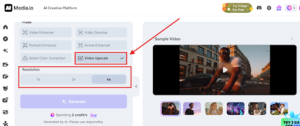
Step 3. Process and Perfect
Click generate. Cloud processing typically takes 1-2 minutes per minute of footage. Once complete, use the comparison slider to examine detailed reconstruction in key areas—faces, text, and natural textures. The results often reveal recovered details you didn’t know were missing from the original. Then you could click download.

Conclusion: Elevate Your Video Legacy to 4K Standard
In the evolving landscape of AI video upscaler solutions, Media.io presents a uniquely balanced proposition. It combines the serious technical capabilities required for true quality 4K upscaling with the accessibility and creative tools needed by real users.
What ultimately sets Media.io apart is its recognition that upscaling isn’t an end goal—it’s a gateway. By integrating seamless access to templates, trends, and community inspiration, the platform ensures your newly enhanced 4K videos have a purpose and presentation worthy of their improved quality.
Experience professional 4K upscaling today—Media.io’s free tier offers the perfect risk-free opportunity to transform how you view and value your existing video assets.